Email alias manager
Written in 2020: some details may have changed since.

The idea
Too much spam? Tired of handing out your email address to every service? Email aliases to the rescue!
Following an idea from Adrien Chinour, I decided to build my own small alias manager for my email addresses. The goal is to quickly generate aliases so you don’t have to give out your real email address when signing up on random websites. That way, if a site sends a bit too much email for your taste, if you no longer use the service, or if unsubscribing turns into an obstacle course, you just delete the alias, and no more unwanted email!
Since my domains are managed by Gandi, I looked into how to work with my email addresses and create aliases through their API.
As for the tech stack, I used Angular and Netlify serverless functions (in NodeJS) to handle the calls to the Gandi API.
The principle is very simple: you log in with a password, predefined in the environment variables of the Netlify serverless functions, you get a JWT signed with a secret known only to the serverless functions, and from then on you are considered authenticated. Since I don’t need to handle multiple users, this fits my use case.
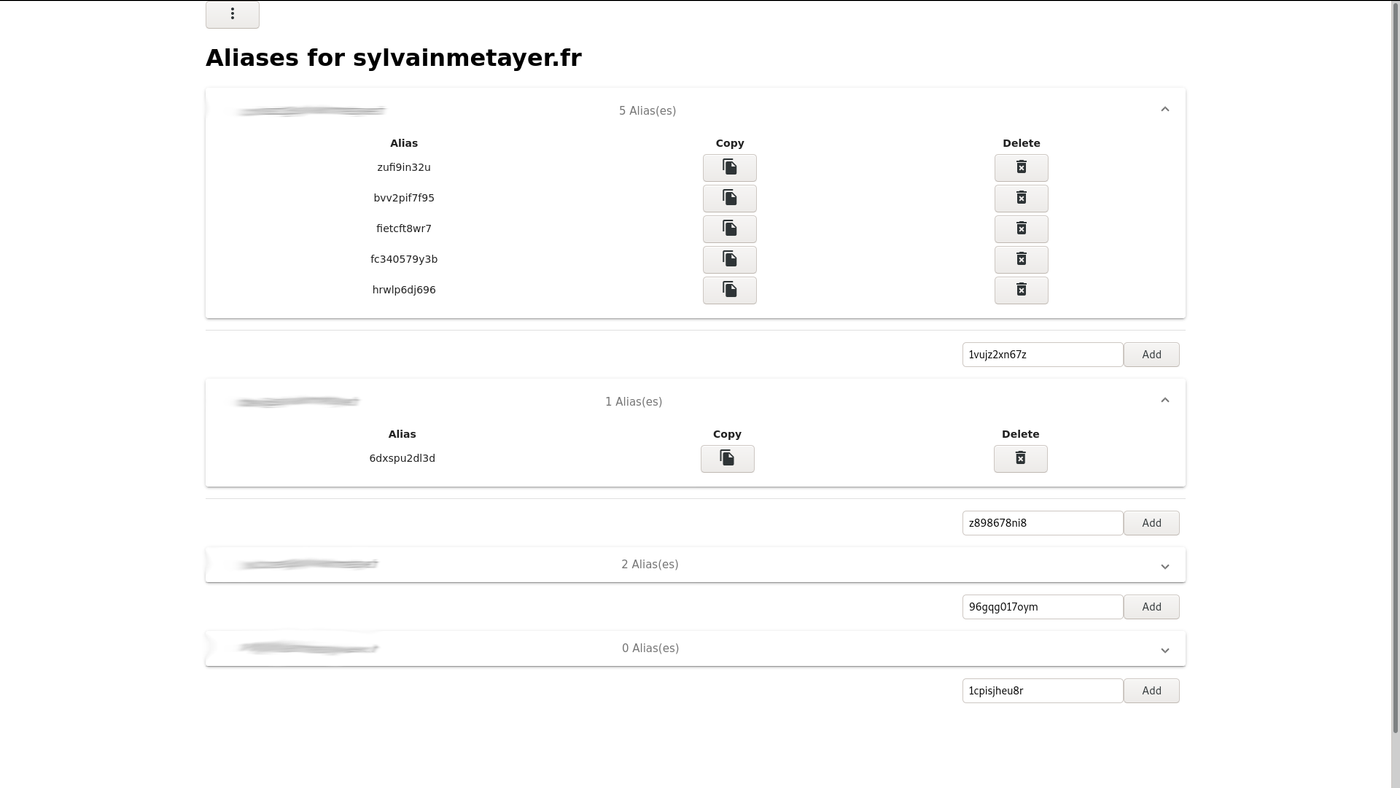
Once authenticated, the serverless functions fetch the list of domains along with the mailboxes associated with them, and you land on the following screen, which lets you manage the aliases of each mailbox.
What’s next
In case other Gandi customers would like to use this project, I tried to integrate OAuth2 so that people could log in through Gandi. It also helped me better understand how OAuth2 works.
So I requested the creation of an application, which gave me an applicationId and an applicationSecret to set up authentication. To test this locally, I used an OAuth2 mock server built by AXA
Unfortunately, Gandi’s v5 API is still in beta and its authentication provider doesn’t yet allow access to domains and mailboxes. 😢
Until that becomes available, I’ve left my work on a dedicated branch.
I also added a one-click Netlify deploy button for anyone who wants to use this small project. You will still need to generate your own API key from your Gandi account settings and fill in a few environment variables, described below.
| Parameter | Description |
|---|---|
| GANDI_API_KEY | Gandi API key |
| JWT_SECRET | A random string used as the JWT secret |
| LOGIN_PASSWORD | The password you want to log in with |
| GANDI_API_HOST | The root URL of the Gandi API: api.gandi.net |
| GANDI_API_VERSION | The Gandi API version: /v5 |
To generate the JWT secret, the following command can come in handy
cat /dev/urandom | tr -dc 'a-zA-Z0-9' | fold -w 32 | head -n 1
The project’s source code is available on GitHub